
jifto for AI agents
jifto is a plug-in for Rhino 8 on Windows. It analyses sites (sunlight, daylight, views, wind, microclimate and stormwater) and models terrain (pads, paths, ponds, cut and fill). While Rhino runs, jifto offers the same work to AI agents on the same computer: Claude Code, Codex, Cursor, Raven and any other agent that speaks MCP or runs Python.
For people
Give your agent the address of this page together with a task. The agent reads the page and does the rest: it finds or starts Rhino, connects to jifto, models, runs the analyses and reports back. You need Rhino 8 with jifto 1.5.1 or later installed, and you sign in to jifto when asked. Copy a starter prompt to begin.
For agents
Outside Rhino (Claude Code, Codex, Cursor and other agents): first make jifto permanent, then follow steps 1 to 6 in order. Run the commands as written. Ask the person before you install software, and never start a second Rhino.
Already inside Rhino? (Raven, Rhino MCP run_python, a Rhino Python script)
- With jifto 1.5.1 or later, Raven needs no step at all: jifto installs this skill into Raven's skills folder by itself and keeps it current, so a new Raven session knows jifto.
- Skip steps 1 to 3: jifto is loaded in this Rhino, so there is no server, token or install. In a first session without the skill, make jifto permanent.
- Run the script below, the same as in the skill's SKILL.md. It adds jifto with
clr.AddReference("jifto")or, when that fails, from the jifto Rhino has already loaded, then callsjifto_statusandjifto_help.JiftoAgentApi.Call(tool, argumentsJson)returns each tool's JSON. - If neither finds jifto, it is not loaded in this Rhino or is older than 1.5: tell the person.
- Read
jifto_statusas step 4 explains (its gates), then work as in step 5.jifto_helpreturns the skill's orientation, andjifto_helpwithtopicreturns each workflow. - Each call returns once its change is applied. The person cannot work in Rhino until a script ends, so keep scripts short: one job wait per script (
jifto_runorjifto_jobwithwait_seconds).
import clr, json
try:
    clr.AddReference("jifto")
except Exception:
    import System  # not on the search path: use the jifto Rhino has already loaded
    loaded = [a for a in System.AppDomain.CurrentDomain.GetAssemblies() if a.GetName().Name == "jifto"]
    if not loaded:
        raise RuntimeError("jifto is not loaded in this Rhino, or is older than 1.5: tell the person.")
    clr.AddReference(loaded[0].Location)
from jifto.Agents import JiftoAgentApi as jifto
def call(tool, **args): return json.loads(jifto.Call(tool, json.dumps(args)))

status = call("jifto_status")  # ready, not_ready.fix, panel_shown, the document's units
print(json.dumps(status, indent=2))
guide = call("jifto_help")     # the orientation and topics; call("jifto_help", topic="terrain-loop") for one
print(guide["topics"])
If your fetch tool summarises web pages, read this page as plain Markdown instead: curl -s https://jifto.com/agents/index.md.
When the task names a real place and the model has no surroundings yet, the Site API returns the terrain, buildings and trees of the area as files. Site context shows how to turn them into a jifto site.
1  Prerequisites  Windows, Rhino 8, jifto 1.5.1 or later, sign-in
2  Rhino          %APPDATA%\jifto\agents\instances\<pid>.json
3  Connect        http://localhost:47110/mcp
                  token: %APPDATA%\jifto\agents\token
4  Ready          jifto_status: ready, not_ready, panel_shown
5  Work           jifto_help, the tools; long analyses are jobs
6  Troubleshoot   the reply says why, or jiftoAgents in Rhino
Make jifto permanent for your next sessions
In a first session, install the jifto skill into your own skills folder, so that your next sessions know jifto without this page. jifto 1.5.1 or later does the same by itself whenever Rhino runs, for Claude Code, Codex and Raven, and keeps the skill current; this step only covers the first session.
- Read
https://jifto.com/agents/skill/v1/manifest.json. - Download each file it lists under
files, from the same folder. - Check each file's SHA-256 against its
sha256. - Write them to your skills folder: Claude Code
%USERPROFILE%\.claude\skills\jifto, Codex%USERPROFILE%\.codex\skills\jifto(or underCODEX_HOME), Raven%RAVEN_ACCOUNT_SKILLS_DIR%\jifto(Raven sets this variable), any other agent with skills: its own folder. - Tell the person in one line, for example: "I installed the jifto skill, so new sessions know jifto."
The scripts do exactly this. They download plain files and run nothing they fetch. Change dest to your agent's folder.
PowerShell
# Your agent's skills folder: Claude Code below; Codex "$HOME\.codex\skills\jifto";
# Raven "$env:RAVEN_ACCOUNT_SKILLS_DIR\jifto".
$dest = "$HOME\.claude\skills\jifto"
$base = "https://jifto.com/agents/skill/v1/"
$manifest = Invoke-RestMethod ($base + "manifest.json")
$staging = "$dest.download"
if (Test-Path $staging) { Remove-Item $staging -Recurse -Force }
foreach ($file in $manifest.files) {
    $target = Join-Path $staging $file.path
    New-Item -ItemType Directory -Force (Split-Path $target) | Out-Null
    Invoke-WebRequest ($base + $file.path) -OutFile $target -UseBasicParsing
    if ((Get-FileHash $target -Algorithm SHA256).Hash.ToLower() -ne $file.sha256) {
        throw "$($file.path) does not match the manifest."
    }
}
if (Test-Path $dest) { Remove-Item $dest -Recurse -Force }
Move-Item $staging $dest
"jifto skill $($manifest.skill_version) installed in $dest"
Python
import hashlib, json, os, shutil, urllib.request
from pathlib import Path

# Your agent's skills folder: Claude Code below; Codex Path.home() / ".codex" / "skills" / "jifto";
# Raven Path(os.environ["RAVEN_ACCOUNT_SKILLS_DIR"]) / "jifto".
dest = Path.home() / ".claude" / "skills" / "jifto"
base = "https://jifto.com/agents/skill/v1/"
manifest = json.load(urllib.request.urlopen(base + "manifest.json"))
staging = dest.with_name(dest.name + ".download")
shutil.rmtree(staging, ignore_errors=True)
for file in manifest["files"]:
    data = urllib.request.urlopen(base + file["path"]).read()
    if hashlib.sha256(data).hexdigest() != file["sha256"]:
        raise RuntimeError(file["path"] + " does not match the manifest.")
    target = staging / file["path"]
    target.parent.mkdir(parents=True, exist_ok=True)
    target.write_bytes(data)
shutil.rmtree(dest, ignore_errors=True)
staging.rename(dest)
print("jifto skill", manifest["skill_version"], "installed in", dest)
1. Check the prerequisites
jifto runs inside Rhino 8 on Windows. Check each item. When one is missing, tell the person what is missing and how to add it.
| Windows | jifto is a 64-bit Windows plug-in. On macOS or Linux, stop here. |
|---|---|
| Rhino 8 | The registry value ExePath under HKLM\SOFTWARE\McNeel\Rhinoceros\8.0\Install names Rhino.exe, by default C:\Program Files\Rhino 8\System\Rhino.exe. The jifto package is built for Service Release 21 and later. |
| jifto | jifto 1.5.1 or later: Yak.exe list shows a line jifto (1.5.1) or a later version. Yak is Rhino's package tool, in the same folder as Rhino.exe. jifto 1.5 is the first version with the agent server; an older jifto has no command jiftoAgents. Update it in the package manager. |
| Signed in | The person signs in to jifto in the jifto panel in Rhino, with a licence or a trial. An agent cannot sign in for the person. jifto_status reports it in step 4. |
Installing jifto
jifto comes from Rhino's package manager, where the package is named jifto. Ask the person before you install it, then use one of these:
- In Rhino: run
_PackageManager, search forjiftoand click Install. - From a browser: open
rhino8://package/search?name=jifto. The Download button on jifto.com opens the same. - From a terminal:
& "C:\Program Files\Rhino 8\System\Yak.exe" install jifto
Rhino loads a newly installed jifto at its next start, so an open Rhino has to be restarted by the person. New jifto accounts get a free trial after email verification.
# Rhino 8: True when it is installed
$key = "HKLM:\SOFTWARE\McNeel\Rhinoceros\8.0\Install"
$rhino = (Get-ItemProperty $key -ErrorAction SilentlyContinue).ExePath
if (-not $rhino) { $rhino = "C:\Program Files\Rhino 8\System\Rhino.exe" }
Test-Path $rhino

# jifto 1.5.1 or later: True when it is installed
$yak = Join-Path (Split-Path $rhino) "Yak.exe"
$jifto = & $yak list | Select-String '^jifto \((\d+\.\d+)'
[bool]$jifto -and [version]$jifto.Matches[0].Groups[1].Value -ge [version]"1.5.1"

# Install jifto. Ask the person first.
# Rhino loads it at its next start.
& $yak install jifto
2. Find Rhino, or start it
jifto loads when Rhino starts. Once Rhino has finished starting, jifto starts its agent server. Each running server writes an instance file, %APPDATA%\jifto\agents\instances\<pid>.json, and removes it when it stops. The file holds the process id, the server's url and port, the jifto version and the start time. The first Rhino listens on port 47110; further ones take the next free port up to 47119.
- Look for a running server. Read the instance files. A file whose
pidis a runningRhinoprocess belongs to a server you can use. When there are several, ask the person which Rhino holds their model. - Rhino is open, but no instance file belongs to it. Do not start a second Rhino. jifto is not loaded, its server is stopped, or the person's organization has turned it off. Ask the person to run
jiftoAgentsin Rhino: it says whether the server runs and, if not, why. See Troubleshooting. - No Rhino is running. Start one:
"C:\Program Files\Rhino 8\System\Rhino.exe" /nosplash /netcore./nosplashskips the start-up screen;/netcoreruns Rhino on .NET Core, which jifto needs. To open a model, add the path of its.3dmfile. Start Rhino in a normal, visible window: the person may need to sign in, and analyses run only while the jifto panel is on screen. - Wait for the instance file of the new Rhino. It appears when Rhino has finished starting, usually within a minute. If Rhino shows a dialog of its own (its licence, an update), the person closes it.
A Rhino that crashed can leave its file behind. The next server to start removes such files; until then, the process check skips them.
$agents = Join-Path $env:APPDATA "jifto\agents"
$ask = "Ask the person to run jiftoAgents in Rhino."

# The newest instance file of a Rhino that is running.
function Get-JiftoServer {
    $files = Join-Path $agents "instances\*.json"
    Get-ChildItem $files -ErrorAction SilentlyContinue |
        Sort-Object LastWriteTime -Descending |
        ForEach-Object { Get-Content $_.FullName -Raw | ConvertFrom-Json } |
        Where-Object {
            $process = Get-Process -Id $_.pid -ErrorAction SilentlyContinue
            $process.ProcessName -eq "Rhino"
        } |
        Select-Object -First 1
}

$server = Get-JiftoServer
if (-not $server) {
    # Never start a second Rhino.
    if (Get-Process Rhino -ErrorAction SilentlyContinue) {
        throw "Rhino is open, but jifto's server is not running. $ask"
    }
    $key = "HKLM:\SOFTWARE\McNeel\Rhinoceros\8.0\Install"
    $rhino = (Get-ItemProperty $key).ExePath
    Start-Process $rhino -ArgumentList "/nosplash", "/netcore"
    $deadline = (Get-Date).AddMinutes(3)
    while (-not ($server = Get-JiftoServer) -and
           (Get-Date) -lt $deadline) { Start-Sleep -Seconds 2 }
    if (-not $server) { throw "No jifto server after 3 minutes. $ask" }
}
$server.url    # http://localhost:47110/mcp
{
"pid": 23816,
"url": "http://localhost:47110/mcp",
"port": 47110,
"jifto_version": "x.y.z",
"started": "2026-11-09T08:12:04.0000000Z"
}3. Connect
The server speaks MCP over Streamable HTTP at http://localhost:47110/mcp, or at the url of the instance file you chose. It accepts connections from this computer only, and every request needs the bearer token in %APPDATA%\jifto\agents\token. Read the token from that file when you set up a client. Do not show it in chat, logs or reports.
In Rhino, the command jiftoAgents prints the same settings with the token filled in, and copies them with its options CopyClaudeCode, CopyCodex and CopyJson.
| Claude Code | Add jifto once with claude mcp add. --scope user makes it available in every project. |
|---|---|
| Codex | Add the [mcp_servers.jifto] table to %USERPROFILE%\.codex\config.toml, with the token in place of <token>. |
| Cursor and other MCP clients | Add the mcpServers entry, with the token in place of <token>. Cursor reads it from %USERPROFILE%\.cursor\mcp.json. |
| Without MCP | jifto_mcp.py is an MCP client in plain Python, standard library only. It finds the running Rhino and reads the token itself. |
| Inside Rhino | Raven, Rhino MCP's run_python and other scripts in Rhino need no server and no token. JiftoAgentApi.Call(tool, argumentsJson) calls the same tools with the same JSON. |
MCP clients load their servers when a session starts. If the jifto tools do not appear after you add jifto, ask the person to restart the agent, or use jifto_mcp.py in the meantime.
A client's settings name one URL. A second Rhino listens on the next free port; to work with it, use its own url.
The jifto skill
The skill holds the workflows, an HTML report kit and two complete example programs. jifto_help returns the same text, so a connected agent has it already. jifto 1.5.1 or later installs it as a skill by itself and keeps it current (see Skill files). To install it at once, run jiftoAgents in Rhino and choose InstallSkill. It writes the skill to %USERPROFILE%\.claude\skills\jifto and %USERPROFILE%\.codex\skills\jifto when Claude Code or Codex is installed, to Documents\Raven\<account>\skills\jifto for Raven, and always to %APPDATA%\jifto\agents\skill\jifto. This site has the same files: see Skill files.
Claude Code (PowerShell)
$token = (Get-Content "$env:APPDATA\jifto\agents\token" -Raw).Trim()
claude mcp add --transport http --scope user jifto http://localhost:47110/mcp --header "Authorization: Bearer $token"
Claude Code (Git Bash)
claude mcp add --transport http --scope user jifto http://localhost:47110/mcp --header "Authorization: Bearer $(cat "$APPDATA/jifto/agents/token")"Codex
# %USERPROFILE%\.codex\config.toml
[mcp_servers.jifto]
url = "http://localhost:47110/mcp"
http_headers = { "Authorization" = "Bearer <token>" }
Cursor (JSON)
{
  "mcpServers": {
    "jifto": {
      "type": "http",
      "url": "http://localhost:47110/mcp",
      "headers": { "Authorization": "Bearer <token>" }
    }
  }
}
Python
# Save https://jifto.com/agents/skill/v1/examples/jifto_mcp.py next to your script.
from jifto_mcp import Jifto
jifto = Jifto()                      # finds the running Rhino, or JIFTO_MCP_URL / JIFTO_MCP_TOKEN
status = jifto.call("jifto_status")
ids = jifto.call("jifto_geometry", action="add", items=[{"kind": "box", "min": [0, 0, 0], "max": [10, 10, 9]}])
Inside Rhino
import clr, json
try:
    clr.AddReference("jifto")
except Exception:
    import System  # not on the search path: use the jifto Rhino has already loaded
    loaded = [a for a in System.AppDomain.CurrentDomain.GetAssemblies() if a.GetName().Name == "jifto"]
    if not loaded:
        raise RuntimeError("jifto is not loaded in this Rhino, or is older than 1.5: tell the person.")
    clr.AddReference(loaded[0].Location)
from jifto.Agents import JiftoAgentApi as jifto
def call(tool, **args): return json.loads(jifto.Call(tool, json.dumps(args)))

status = call("jifto_status")  # ready, not_ready.fix, panel_shown, the document's units
print(json.dumps(status, indent=2))
guide = call("jifto_help")     # the orientation and topics; call("jifto_help", topic="terrain-loop") for one
print(guide["topics"])
4. Check that jifto is ready
Call jifto_status first. It answers even when jifto cannot work yet, and then says why.
ready: jifto accepts work. When it isfalse,not_ready.reasonsays why andnot_ready.fixwhat to do. Most fixes need the person: pass them on and wait. Do not work around them.signed_in: the person is signed in to jifto.panel_shown: the jifto panel is on screen. Analyses and their display run only while it is.jifto_analysis,jifto_run,jifto_resultsandjifto_captureopen it themselves; the Rhino commandjiftoTogglePanelopens and closes it by hand. Keep Rhino visible, so the person can follow the work.document: its units andmetres_per_unit. Coordinates you send are model units; replies give metres, m² and m³.analyses,terrainsandpending: what exists, and work jifto has not caught up with yet (jifto_syncruns it).
Every tool except jifto_status, jifto_help and jifto_report_kit checks these conditions first, in this order, and refuses with the same reason and fix:
| jifto says | What to do |
|---|---|
| Nobody is signed in to jifto. | Ask the user to open the jifto panel in Rhino and sign in. |
| The jifto licence agreement has not been accepted yet. | Ask the user to open the jifto panel in Rhino and accept it. |
| The user's jifto seat is in use on another device. | Ask the user to open the jifto panel, which explains how to take the seat over. |
| The user's organization has turned off the jifto Assistant, which includes control of jifto by AI agents. | Tell the user; an organization admin can allow the Assistant on jifto.com. |
| No Rhino document is open. | Ask the user to open or create a document. |
| jifto has not prepared the document yet. | Open the jifto panel (any jifto_run, jifto_capture or jifto_analysis call does), then call again. |
The organization. An organization admin can turn off the Assistant on jifto.com (Account, Organization, Feature access). This includes control of jifto by AI agents. jifto then does not run its agent server: step 2 finds no instance file, and jiftoAgents in Rhino says why. jifto learns the setting with the person's licence, at sign-in or when Rhino starts, and follows later changes. Before that, the server runs and its tools ask for a sign-in. A running server stops when the setting arrives, and starts again as soon as the Assistant is allowed. Scripts inside Rhino are refused with the gate above. Only an organization admin can change the setting: tell the person, and stop.
PowerShell
$token = (Get-Content "$env:APPDATA\jifto\agents\token" -Raw).Trim()
$body = '{"jsonrpc":"2.0","id":1,"method":"tools/call","params":{"name":"jifto_status","arguments":{}}}'
$reply = Invoke-RestMethod "http://localhost:47110/mcp" -Method Post -Body $body `
    -ContentType "application/json" -Headers @{ Authorization = "Bearer $token" }
$reply.result.content[0].text
curl (Git Bash)
curl -s http://localhost:47110/mcp \
  -H "Authorization: Bearer $(cat "$APPDATA/jifto/agents/token")" \
  -H "Content-Type: application/json" \
  -d '{"jsonrpc":"2.0","id":1,"method":"tools/call","params":{"name":"jifto_status","arguments":{}}}'
Ready
{
  "ok": true,
  "product": "jifto",
  "version": "x.y.z",
  "server_url": "http://localhost:47110/mcp",
  "output_folder": "C:\\Users\\you\\AppData\\Roaming\\jifto\\agents\\output",
  "skill": { "source": "site", "version": "2026.11.09", "content": "3f9c2a71d04e", "url": "https://jifto.com/agents/skill/v1/" },
  "signed_in": true,
  "ready": true,
  "panel_shown": false,
  "document": { "name": "", "path": "", "units": "Meters", "metres_per_unit": 1.0, "objects": 0 },
  "location": { "place": "Brussels", "latitude": 50.85, "longitude": 4.35 },
  "analyses": [
    { "module": "sunlight", "on": false, "analysis_objects": 0, "context_objects": 0, "running": false }
  ],
  "terrains": [],
  "next": "jifto_help for the workflows; jifto_geometry to make objects; ..."
}
Not ready
{
  "ok": true,
  "product": "jifto",
  "signed_in": false,
  "ready": false,
  "panel_shown": false,
  "not_ready": {
    "reason": "Nobody is signed in to jifto.",
    "fix": "Ask the user to open the jifto panel in Rhino and sign in."
  }
}
5. Work
Start with jifto_help. Without arguments it returns the orientation and the list of workflows; topic returns one workflow with its calls in order; query searches jifto's documentation. Then use the tools below.
The contract
- Every call that changes something returns after the change is applied and readable, with the state it produced. Never sleep or poll between calls: the next call sees the change.
- Long analyses are jobs.
jifto_runreturns ajob_id;jifto_jobwithwait_secondsreturns as soon as the module says done or failed, with progress in the module's own units (simulated minutes of a rain event, solver steps of spin-up and averaging). A job still running when your wait ends is not stuck; its progress says how far it got. - Inputs are object ids and values, never picks. Make objects with
jifto_geometry(or any Rhino tool) and pass their ids. - Coordinates are model units (
jifto_statusgives the units). Lengths, areas and volumes in replies are metres, m² and m³; settings are in the units the panel shows (m, degrees, mm/h, hours). - Errors say what to do instead (
{"ok": false, "error": ..., "fix": ...}). Read the fix.
jifto_geometry {"action": "layers", "only": ["Site", "Option A"]}
jifto_analysis {"module": "sunlight", "analysis": ["<ground id>", "<option A building ids>..."]}
jifto_settings {"set": {"sunlight.day": "equinox"}}
jifto_run {"module": "sunlight", "wait_seconds": 120}
jifto_results {"module": "sunlight", "points": true, "path": "<folder>/A-equinox.csv"}
jifto_capture {"view": "top", "frame": ["<ground id>"], "width": 1200, "height": 1200, "path": "<folder>/A-equinox.png"}
Tools
14 tools. Each takes and returns a JSON object; MCP clients also receive each tool's input schema with the tool list.
| Tool | Use it to |
|---|---|
jifto_status | See what exists: document, units, location, analyses and their jobs, terrains, vegetation. Call first. |
jifto_help | Read a workflow (topic) or search jifto's documentation (query). |
jifto_geometry | Make and edit Rhino objects by value: boxes, extruded footprints, curves, meshes from heights; move, update (same id), delete; show and hide layers. |
jifto_terrain | Make a terrain from a mesh or closed curve; add pads, paths, ponds, streams, walls; set their settings; measure cut and fill, water held; colour the surface (cut_fill, slope, elevation). |
jifto_trees | Plant a whole terrain in one call (area: one ecosystem that keeps off paths and follows the terrain's edits), a line of trees along a curve (along), or single trees (points). |
jifto_analysis | Give an analysis its surfaces (analysis) and the objects that shade or shelter them (context); the wind domain. |
jifto_settings | Read and change analysis settings, validated and read back (sunlight.day, stormwater.RainIntensity ...). |
jifto_run, jifto_job | Start an analysis job; wait for it, see its progress, cancel it. |
jifto_results | Read a finished result: legend, statistics by band, summary per object, every point to CSV. |
jifto_capture | Save a PNG in jifto's report look (top plan or 3/4 view), with the legend as data. |
jifto_report_kit | Get the HTML report style (CSS, legend and bar components, fonts, logo). |
jifto_batch | Run many calls in one request (loops). |
jifto_sync | Make jifto catch up after you changed Rhino objects some other way. |
Analyses
jifto_run starts each of these as a job and returns a job_id. jifto_job with wait_seconds returns as soon as the job is done or failed. Keep each wait within your client's time limit for a tool call, and call jifto_job again while the state is running.
| Module | Kinds |
|---|---|
| sunlight | sun_hours (default), energy, planting, season, season_energy, shadows |
| daylight | vsc (default), df, sda |
| wind | velocity (default), comfort |
| microclimate | utci (default) |
| stormwater | depth (default), velocity |
| views | score (default), line_of_sight, single |
jifto_analysis {"module": "stormwater", "analysis": ["<terrain id or ground mesh id>"]}
jifto_settings {"set": {"stormwater.RainIntensity": 60, "stormwater.SimulationDuration": 0.5, "stormwater.Resolution": 1.0}}
jifto_run {"module": "stormwater", "kind": "depth"}
jifto_job {"job_id": "stormwater-3", "wait_seconds": 120}
jifto_results {"module": "stormwater", "points": true}
Workflows
Each workflow gives the calls in order and what to read back. jifto_help with topic set to the name returns the same text.
terrain-loop: terrain, modifiers, and an optimisation loop with cut and fill after every edit.compare-sunlight: design options compared by sun hours on chosen days.stormwater: rain on a terrain, ponding, and comparing designs.vegetation: trees over a whole site, woods inside curves, avenues along paths.wind: wind around buildings, with a domain.captures: images that look like jifto's report.html-reports: an HTML report that answers the question.scripts: the same from Python inside Rhino.
Things that trip agents up
- A pad follows a structure: give it the platform (a slab whose top is the pad), not the building. Its height is the slab's: move the slab to raise the pad.
- A pond follows one closed rim curve. Its
Water Levelis the height above its floor and stops at the brim;Depthis the floor below the rim's lowest point. - Paths have a cross-section, not one width; their curve sets the line.
- Sunlight computes on its analysis surfaces. Give buildings as analysis too when facades and roofs matter (they still cast shadows); give them as context when only the ground matters.
- A stormwater event lasts
stormwater.SimulationDurationhours (at least 0.5); the job ends at the event's end and the result is the water then. - Wind needs a domain (
jifto_analysis module=wind domain=...); without it the job fails and says so. - Trees over a site are one call:
jifto_trees {"type": "deciduous", "area": {"terrain": "Site", "spacing_m": 8}}, as the Vegetation panel's Add → Area. Never compute tree positions and plant them one by one: an area ecosystem keeps off paths, pads and ponds and follows the terrain's edits; single trees do neither. Woods inside curves:within; clearings:avoid; rows:along.
jifto_batch {"calls": [
  {"tool": "jifto_geometry", "arguments": {"action": "update", "id": "<path curve id>", "points": [[...], ...]}},
  {"tool": "jifto_terrain", "arguments": {"action": "measure", "terrain": "Site"}}]}
Site context
jifto analyses what is in the Rhino document. When the task names a real place and the model has no surroundings yet, the Site API returns the terrain, buildings and trees inside a polygon as files, without Rhino: terrain.glb, buildings.glb and trees.geojson.gz. It needs a Site API key (JIFTO_API_KEY). Ask the person for one, or skip this step.
- Order and download the site as the Site API's quickstart shows.
- Read the meshes. Both are glTF 2.0 with Draco compression; the Site API page has a Python reader. Vertices are metres from the site's centre with Y up: give Rhino
[x, -z, y](east, north, height), divided bymetres_per_unitwhen the document is not in metres. - Add them with
jifto_geometryadd,kindmesh(vertices,faces): the terrain on a layer "Site", each building on a layer "Context". - Make the terrain with
jifto_terraincreatefrom the terrain mesh's id. It becomes the terrain's Base, which cut and fill are measured against. - Plant the trees with
jifto_trees. Each tree is a point of longitude, latitude and elevation: convert it to the job'scrsand subtract itsorigin. Passon_terrain, and the tree'sheight_mandcrown_diameter_masheight_mandcrown_m. Itscrown_stylegives thetype: conical isconifer, blob isdeciduous; columnar, umbrella and palm keep their names. - Use the buildings as context of the analyses (
jifto_analysiscontext), or as analysis surfaces when facades matter.
Heights follow the source's vertical datum, which differs by country. Within one site they are consistent.
jifto_geometry {"action": "add", "items": [{"kind": "mesh", "name": "Terrain", "layer": "Site",
  "vertices": [[x, -z, y], ...], "faces": [[0, 1, 2], ...]}]}
jifto_terrain {"action": "create", "object_id": "<terrain mesh id>", "name": "Site"}
jifto_geometry {"action": "add", "items": [{"kind": "mesh", "name": "Building 12", "layer": "Context",
  "vertices": [...], "faces": [...]}]}
jifto_trees {"type": "conifer", "points": [[x, y, 0], ...], "on_terrain": "Site",
  "height_m": 14, "crown_m": 6}
jifto_analysis {"module": "sunlight", "analysis": ["<terrain id>"], "context": ["<building ids>"]}
Examples
Two complete tasks. Each is a Python program that talks to jifto over MCP through jifto_mcp.py, as an agent does, and writes an HTML report with the report kit. Read them for the order of calls. To run one, put it next to jifto_mcp.py and start it with an empty Rhino document open: it adds its own objects.
courtyard_sunlight.py
Three design options around a courtyard, compared by sun hours on the equinox and both solstices, written up as an HTML report in jifto's look.
Talks to jifto over MCP (jifto_mcp.py), the way Claude Code or Codex do. Builds the options in an empty Rhino document, runs one sunlight job per option and day, reads the courtyard's sun hours from the points, captures each result and writes report.html with the report kit.
Run: python courtyard_sunlight.py <output folder>
path_over_hills.py
A winding path across hills, chosen among candidate routes by cut and fill and by the water left on it after a storm, with conifers on the hills; written up as an HTML report.
Talks to jifto over MCP (jifto_mcp.py), the way Claude Code or Codex do. Builds the hills as a jifto terrain, lays each candidate route out with a profile no steeper than the path allows, measures the earthworks, rains on each design and reads the water standing on the path, then captures and reports.
Run: python path_over_hills.py <output folder>
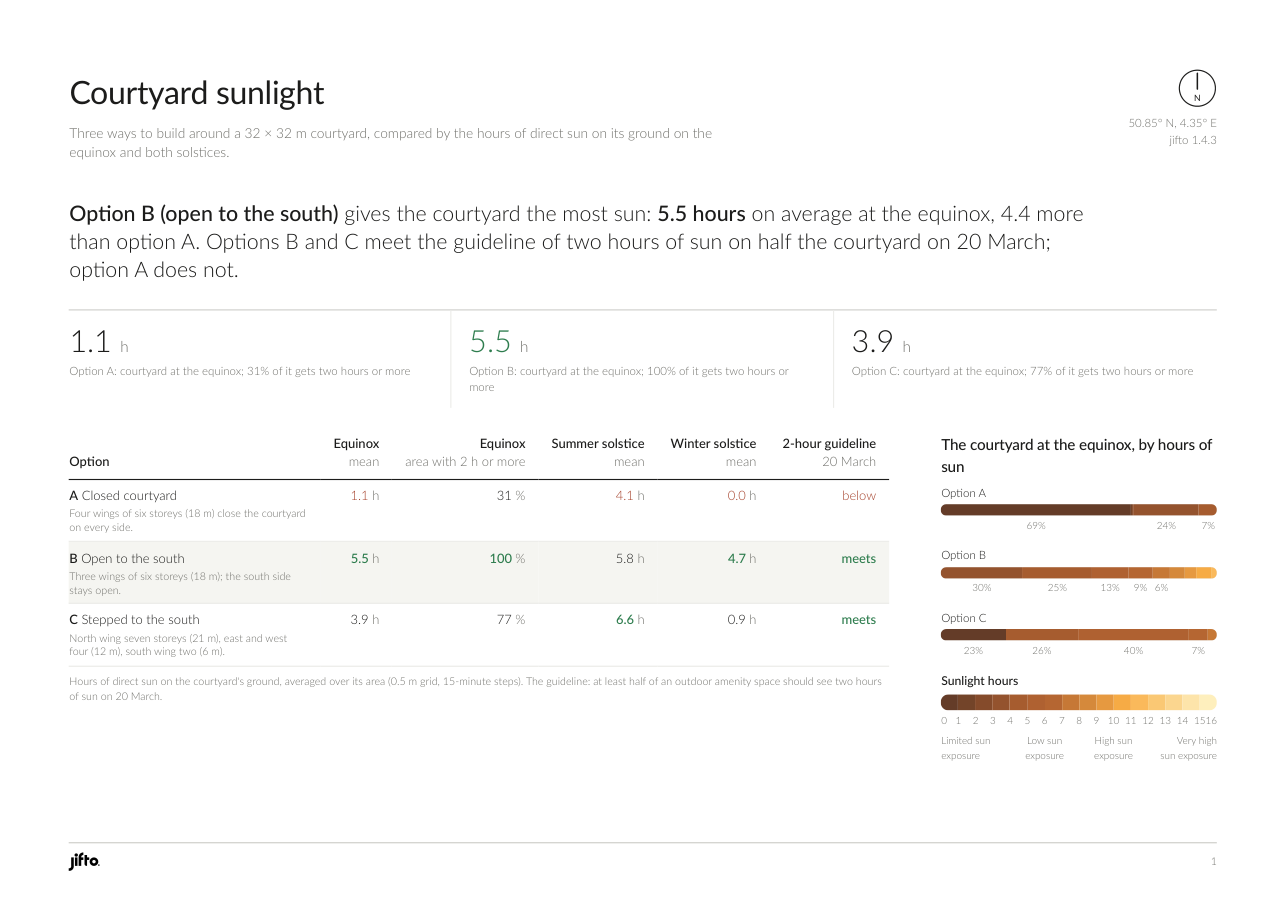
courtyard_sunlight.py writes.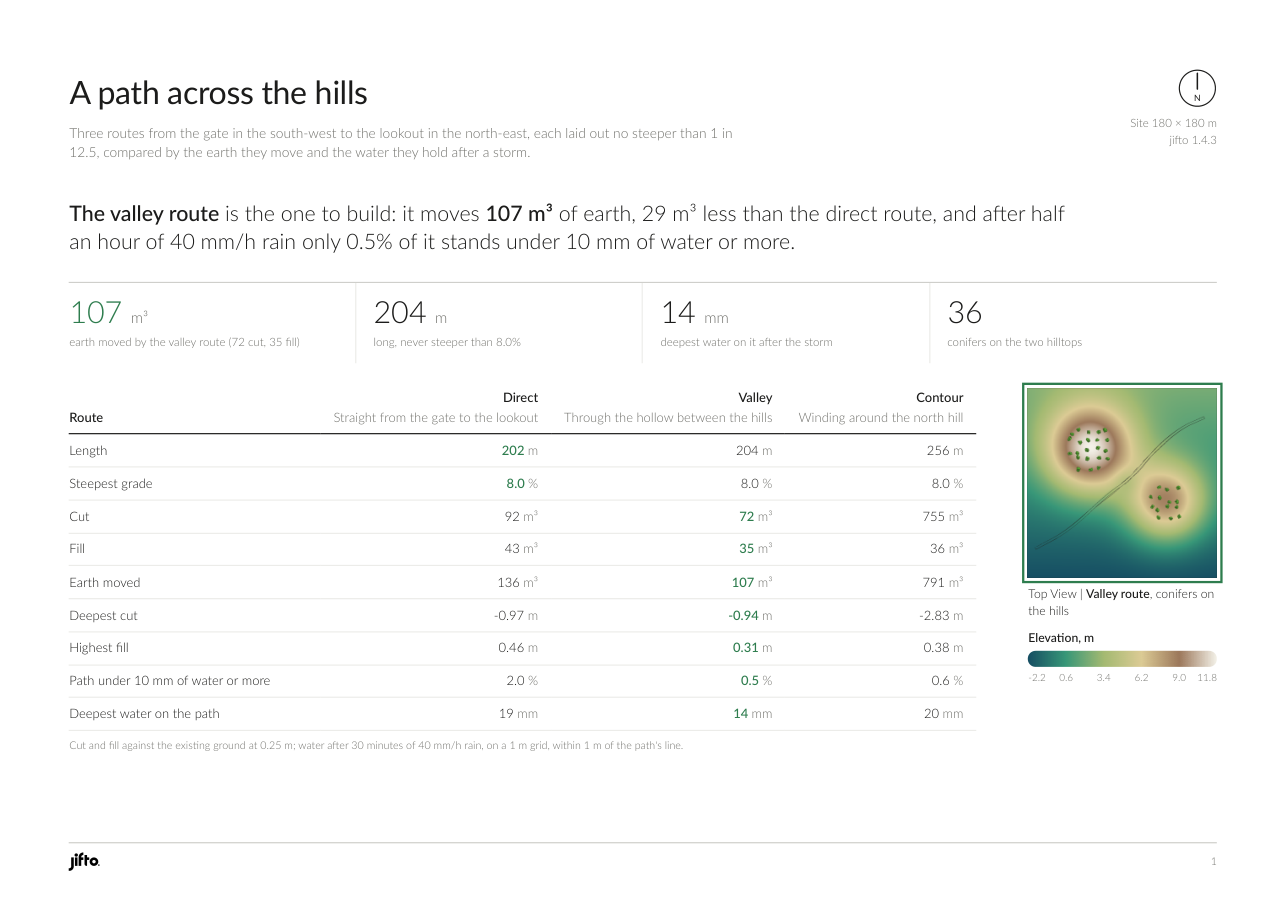
path_over_hills.py writes.Skill files
The jifto skill as plain files, so an agent can read it without Rhino. This page is built from them, and so is the copy inside the plug-in.
Installed for the agents on this computer. Whenever Rhino runs, jifto 1.5.1 or later installs the skill by itself into the skills folder of every agent it finds: Claude Code (%USERPROFILE%\.claude\skills\jifto), Codex (%USERPROFILE%\.codex\skills\jifto, or under CODEX_HOME) and each Raven account (Documents\Raven\<account>\skills\jifto). It writes only when the content changed, keeps the copy current, and removes the folders it installed while the organization has turned off the Assistant. It never changes an agent's MCP settings. jiftoAgents with InstallSkill does the same at once.
Where the plug-in gets them. jifto keeps its skill up to date from this site, so workflows, examples and the report kit can improve between releases. When its agent server starts, jifto reads https://jifto.com/agents/skill/v1/manifest.json on a background thread, downloads the files that changed, checks each one's size and SHA-256, and keeps them in %APPDATA%\jifto\agents\skill-cache\v1. jifto_help, the report kit and jiftoAgents with InstallSkill use that copy. Before the first check, offline, or when a published skill needs a newer jifto, they use the copy inside the plug-in. No tool call waits for the network. jifto_status reports which copy is in use under skill.
The v1 in the address is the version of the agent API. An incompatible API gets its own folder next to it, and released plug-ins keep reading theirs. The manifest lists every file with its size and SHA-256, the skill's version and the oldest jifto it needs.
manifest.json: every file with its size and SHA-256, the skill's version, the agent API version and the oldest jifto it fits. The plug-in reads this.SKILL.md: Use whenever the user mentions jifto, or asks for terrain modelling, cut and fill, sunlight, daylight, wind, microclimate or stormwater analysis in Rhino. jifto is a Rhino 8 plug-in; inside Rhino (Raven, Rhino MCP run_python) it is already loaded and reached with the Python script in this skill, outside Rhino through its MCP server. It models terrain (pads, paths, ponds, cut and fill), plants trees over whole sites in one call, runs analyses as jobs, reads their numbers, captures images in jifto's report look and writes HTML reports.topics/captures.md: Captures in jifto's report looktopics/compare-sunlight.md: Comparing design options by sunlighttopics/html-reports.md: HTML reports that answer the questiontopics/scripts.md: From Python inside Rhinotopics/stormwater.md: Stormwater: rain on a terraintopics/terrain-loop.md: Terrain modelling and the edit-measure looptopics/vegetation.md: Vegetation: planting a sitetopics/wind.md: Wind around buildingsexamples/courtyard_sunlight.py: Three design options around a courtyard, compared by sun hours on the equinox and both solstices, written up as an HTML report in jifto's look.examples/jifto_mcp.py: A minimal MCP client for jifto's agent server, with the Python standard library only.examples/path_over_hills.py: A winding path across hills, chosen among candidate routes by cut and fill and by the water left on it after a storm, with conifers on the hills; written up as an HTML report.report/jifto-report.css: jifto report kit: the visual language of jifto's PDF report (Export > Report) for HTML reports agents write.report/jifto-report.js: jifto report kit: draws jifto's legends and distribution bars from the JSON jifto's tools return.report/north.svg

# The jifto skill for Claude Code, without Rhino. In Rhino, jiftoAgents > InstallSkill does the same.
$base = "https://jifto.com/agents/skill/v1"
$dest = Join-Path $env:USERPROFILE ".claude\skills\jifto"
$files = @(
    "SKILL.md",
    "topics/captures.md",
    "topics/compare-sunlight.md",
    "topics/html-reports.md",
    "topics/scripts.md",
    "topics/stormwater.md",
    "topics/terrain-loop.md",
    "topics/vegetation.md",
    "topics/wind.md",
    "examples/courtyard_sunlight.py",
    "examples/jifto_mcp.py",
    "examples/path_over_hills.py",
    "report/jifto-report.css",
    "report/jifto-report.js",
    "report/north.svg"
)
foreach ($file in $files) {
    $target = Join-Path $dest $file
    New-Item -ItemType Directory -Force (Split-Path $target) | Out-Null
    Invoke-WebRequest "$base/$file" -OutFile $target
}
6. Troubleshooting
A refused call says what was wrong (error) and what to do instead (fix). For everything before the first call, use this table.
| What you see | Cause and what to do |
|---|---|
| No instance file, and no Rhino is running | Start Rhino (step 2). |
| No instance file, but Rhino is open | Rhino may still be starting: wait for it. Otherwise ask the person to run jiftoAgents in Rhino. It prints whether the server is running, stopped or off, and why. When it is stopped, its option Start starts it. When it is off because the organization has turned off the Assistant, only an organization admin can change that. If Rhino does not know the command, jifto is not installed or is older than the agent server (step 1). |
| The connection fails after the person signed in | The person's organization may have turned off the Assistant: the server stops when jifto learns this. jiftoAgents says so. |
Rhino's command history shows jifto: the AI agent server could not start; ports 47110 to 47119 are taken | Ten Rhinos or other programs hold the ports. Ask the person to close Rhinos they do not need. |
| No server in a headless Rhino (one running without its user interface) | jifto does not start its agent server there. Start Rhino normally (step 2). |
| Connection refused | Nothing listens on that port. Read the url from the instance file again: another Rhino may hold a different port, or the server stopped. |
HTTP 401: Missing or wrong bearer token. Run jiftoAgents in Rhino to see the connection settings. | The header is missing, or the token changed (jiftoAgents with NewToken makes a new one). Read the token file again and update the client. For Claude Code: claude mcp remove jifto --scope user, then add jifto again (step 3). |
HTTP 403: Only loopback hosts may connect. or Browser origins may not connect. | Connect from the same computer to localhost or 127.0.0.1, from a program, not from a web page. |
HTTP 404: jifto's MCP endpoint is /mcp. | Use the path /mcp. |
not_ready: the organization has turned off the jifto Assistant | Only an organization admin can allow it again, on jifto.com. Tell the person. |
not_ready: sign-in, the licence agreement or the seat | The person resolves it in the jifto panel in Rhino. Wait, then call jifto_status again. |
A job fails with feature-unavailable | The analysis is not part of the person's jifto licence. |
The jifto panel did not open. | Ask the person to open the jifto panel, for example with jiftoTogglePanel, and to close any dialog that is open in Rhino. |
A reply holds sync.pending saying changes wait for the Rhino command that is running, or jifto_run answers jifto cannot start the run yet | A Rhino command is running. Ask the person to finish or cancel it (Esc), then call again. |
A capture fails with Rhino's window cannot show views now | A dialog is open in Rhino, or the screen is locked. Ask the person to close the dialog or unlock the screen. |
| A call does not return | Rhino may be showing a dialog. Ask the person to look at Rhino. |
A job is still running when wait_seconds ends | It is not stuck: its progress says how far it got. Call jifto_job again. |
jifto_status shows skill.source embedded | jifto has not fetched the skill from this site yet: it is offline, the first check is still running, or the organization has turned off the Assistant. The copy inside the plug-in works the same; skill.last_check says why. |
| The jifto tools do not appear in the agent | Restart the agent session. claude mcp list shows whether Claude Code reaches jifto. In the meantime, use jifto_mcp.py. |
HTTP/1.1 401 Unauthorized
WWW-Authenticate: Bearer realm="jifto"

Missing or wrong bearer token. Run jiftoAgents in Rhino to see the connection settings.
{
"ok": false,
"error": "The stormwater analysis has no terrain to rain on.",
"fix": "Assign the terrain with jifto_analysis module=stormwater analysis=[terrain id]."
}Starter prompts
For people: copy a prompt into your agent (Claude Code, Codex, Cursor, Raven or another) and change the task to yours. The first sentence is what matters: it sends the agent to this page.
- Have Rhino 8 with jifto 1.5.1 or later installed, and sign in to jifto when the agent asks.
- Keep Rhino on screen. You can watch the agent work in the viewport and the jifto panel.
- The same prompts work for agents inside Rhino: in Raven, "Read https://jifto.com/agents/ and then ..." works the same way.
- Name your files and layers, or open the model first, so the agent knows what to study.
Courtyard
Read https://jifto.com/agents and then: compare three courtyard options by sun hours on the equinox and both solstices, and write me an HTML report.Path
Read https://jifto.com/agents and then: in the open Rhino model, make the ground on layer "Site" a jifto terrain, compare three routes for a path from the gate to the lookout by cut and fill and by the water standing on them after a storm, and write me an HTML report.Stormwater
Read https://jifto.com/agents and then: rain 60 mm/h for 30 minutes on the terrain in the open Rhino model, tell me where water stands deepest, and show me a plan of it.Wind
Read https://jifto.com/agents and then: run a wind comfort study around the buildings on layer "Proposal" and tell me which entrances are uncomfortable.